

HPE OpsRamp, as a unified IT operations and observability platform, provides a set of common services that help organizations monitor, manage, and automate their IT environments. These services commonly include alerting and event intake, monitoring, resource management, and integrations with external systems.
The HPE OpsRamp platform exposes these capabilities through a collection of RESTful application programming interfaces (APIs) so that administrators and operators can interact with the platform programmatically—beyond what is available through the UI.
If you are looking for a quick way to discover what you can do with the HPE OpsRamp APIs using popular tools that don’t require programming (such as Postman), this blog post is for you. You can use these APIs to integrate external monitoring tools for alert ingestion, automate operational workflows, and retrieve platform data for reporting and analytics.
In Part 1 of this series, I will start by showing you how to generate API credentials, define Postman collection variables, obtain an OAuth access token, and make one subsequent secure REST API call end-to-end: creating an alert in HPE OpsRamp via API.
Introducing the foundational APIs for HPE OpsRamp
The foundational APIs for HPE OpsRamp are designed to enable IT administrators and IT operators to automate IT operations by programmatically interacting with platform services and resources. These APIs conform to REST principles, use JSON payloads, and support standard HTTP request methods such as GET and POST.
For example, with OpsRamp APIs you can:
- Create alerts from external systems and tools.
- Retrieve operational data (for example, incidents) using search endpoints.
- Create or manage resources depending on your use case and permissions.
OpsRamp API documentation: OpsRamp Developer Portal
Postman
Postman is an API platform for building and using APIs. You can sign into your Postman account either from the web application or from the desktop application. In this blog post, I am showing how to use Postman to configure collection variables once, generate an OAuth access token, and then make subsequent secure REST API calls. You can use any other software like Insomnia, Hoppscotch etc. instead of Postman.
Preparing to use the HPE OpsRamp APIs
As an IT administrator or a developer, before you can work with OpsRamp APIs, you will need to generate API client credentials (ClientId and ClientSecret) and capture your TenantId (tenant can be partner, client or service provider ID) and token endpoint. The internal OpsRamp guide achieves this by creating a custom integration configured for OAuth2.
To generate API credentials in OpsRamp, proceed as follows:
- Log in to OpsRamp as an administrator (Partner admin is recommended).
- Select the client you want to use APIs for (you can also use Partner APIs but in most cases, client level APIs are preferred, and we have selected the same)
- Go to Setup → Account → Integrations and ensure you are in the correct client.
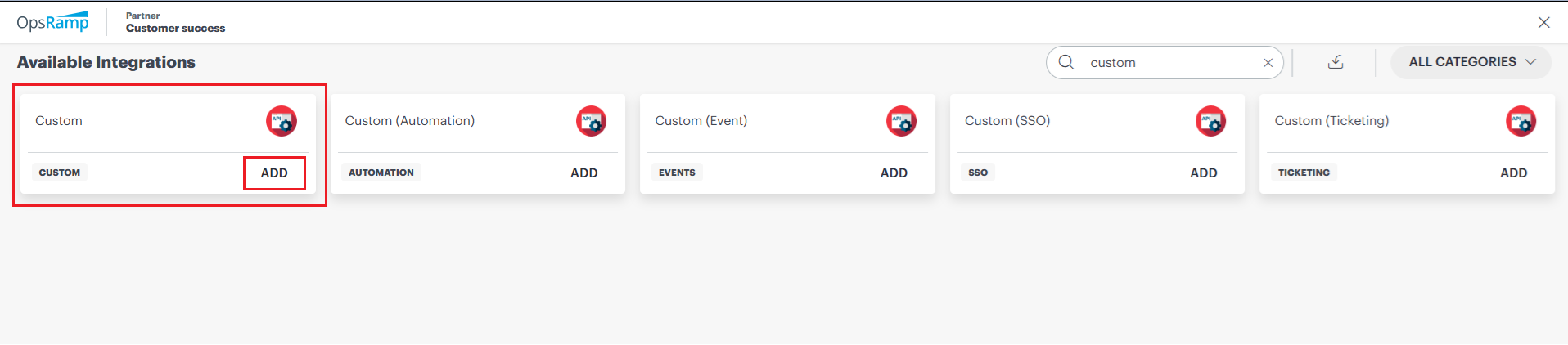
- Search for Custom Integration and add a new one.
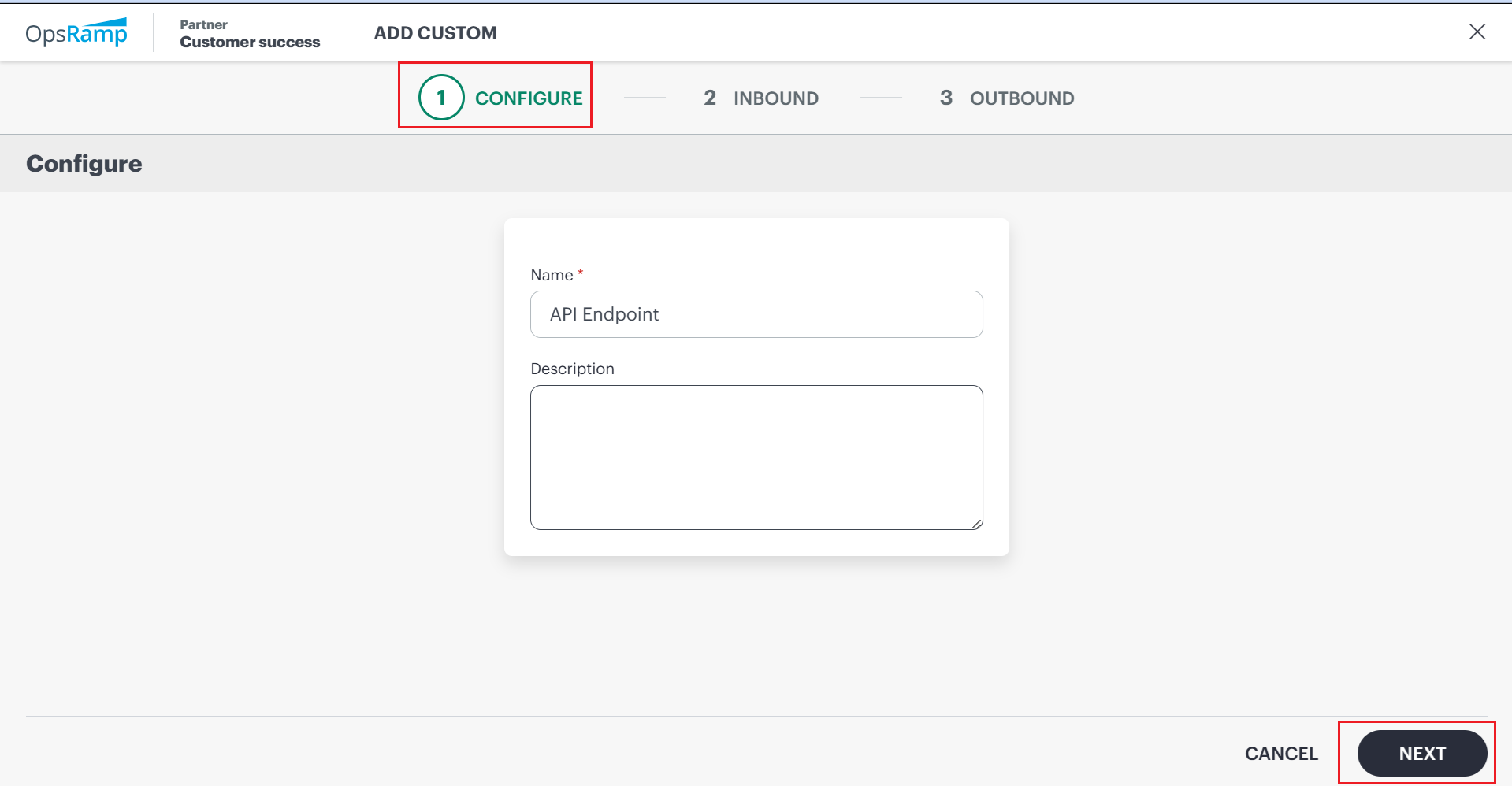
- Open the integration. In the Inbound tab, select Authentication Type as OAUTH2 and set Role as Client Administrator (or any role with API access).
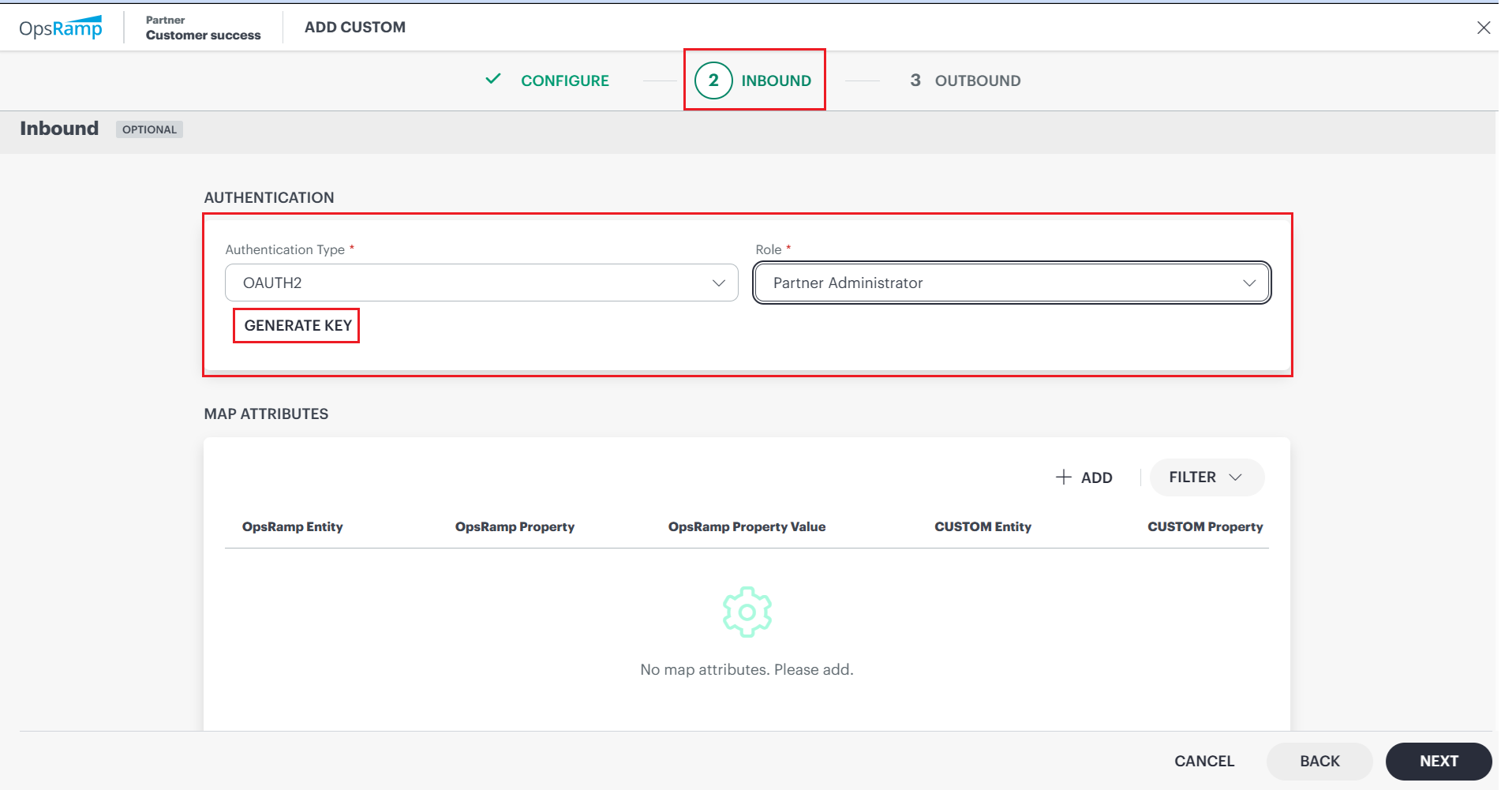
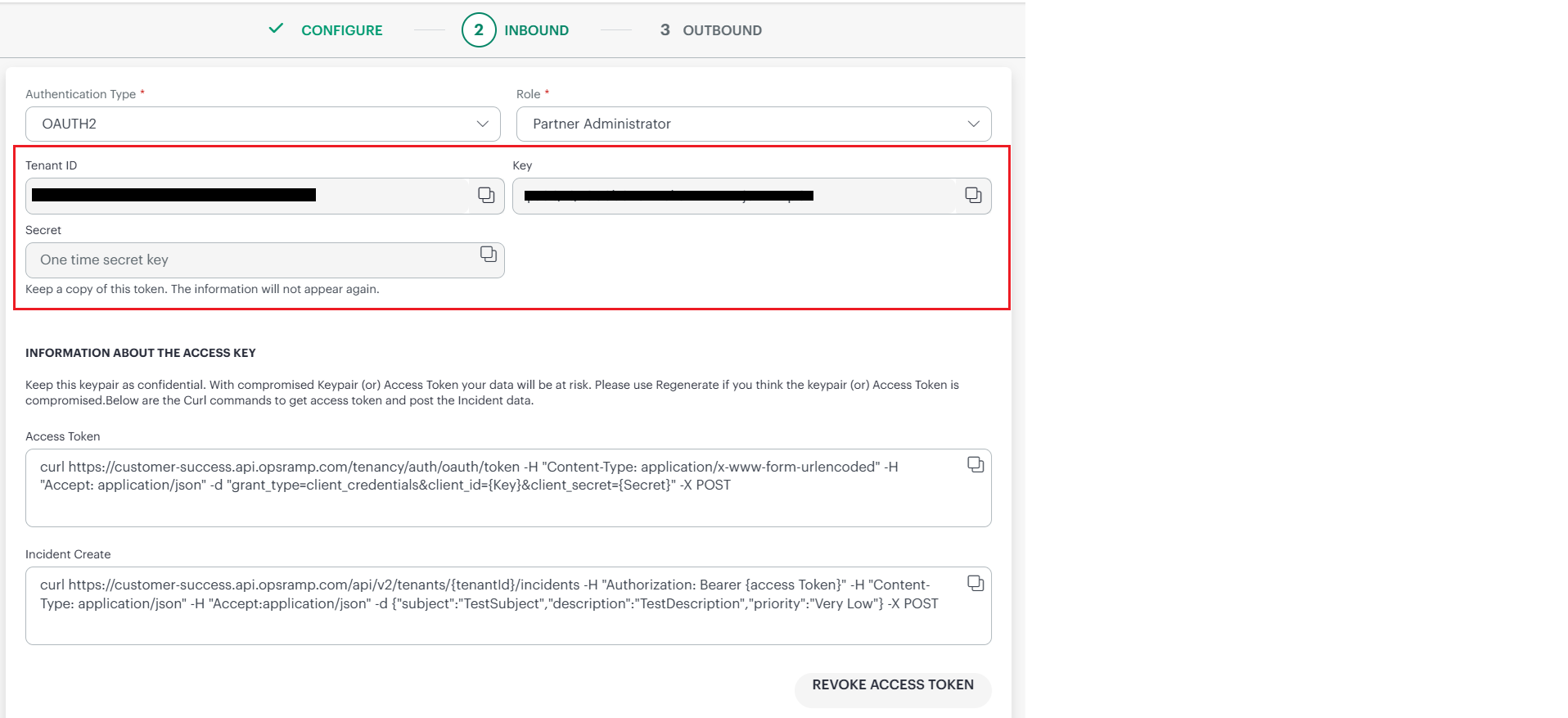
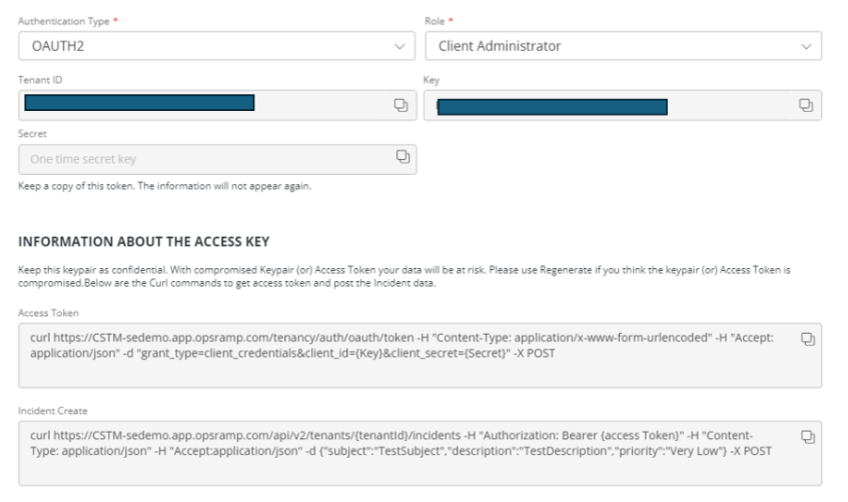
- Click Generate Key and copy Tenant ID, Key (ClientId), and Secret (ClientSecret).
- Make a note of the Access Token URL shown by the integration.
Important note: You will be able to copy the secret only at the time of creation. If you close the integration page, the secret will not be available for copying, and you will need to create a new integration to generate a new secret.
Setting the Postman collection for the OpsRamp APIs
You can organize your requests in a Postman collection so that all requests share the same variables and authentication settings. In this blog, you only need two requests in the collection: Generate Access Token and Create Alert.
Defining the OpsRamp APIs collection variables
The collection uses Postman collection variables that are available throughout all requests in the collection. Select your collection and then select the Variables tab as shown below.
Environment > Create Environment.
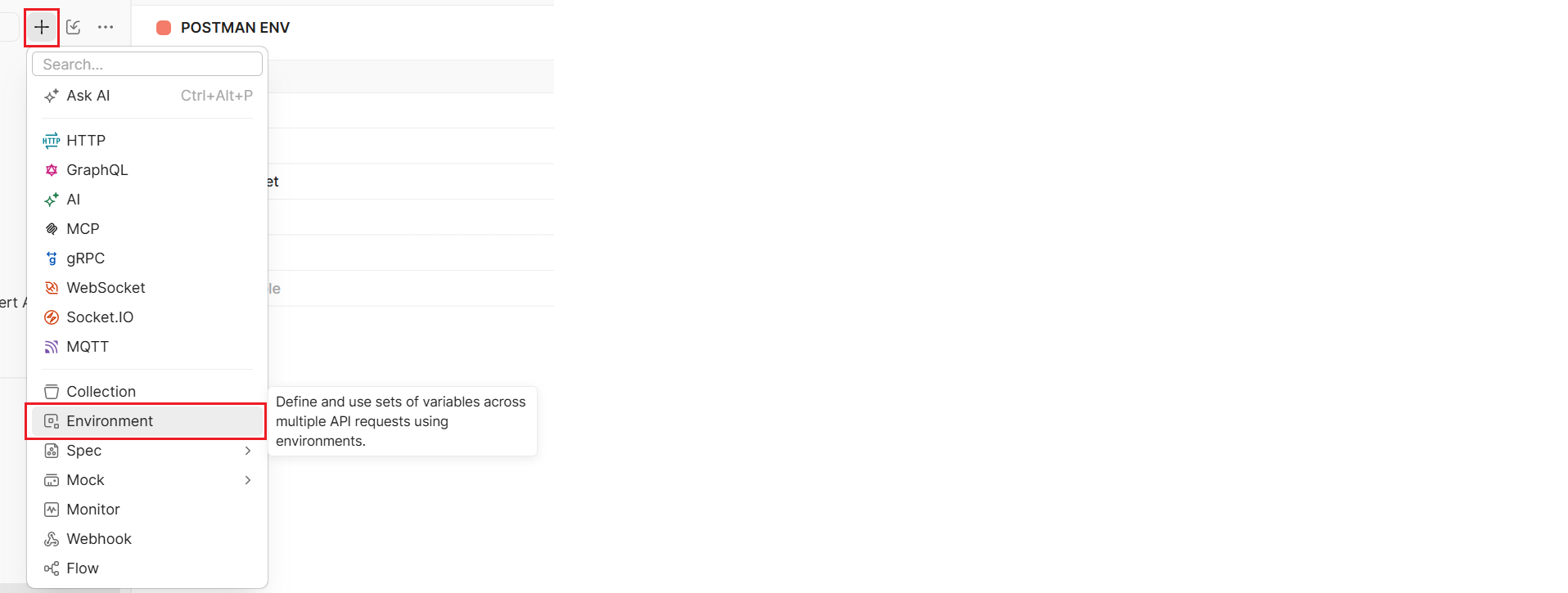
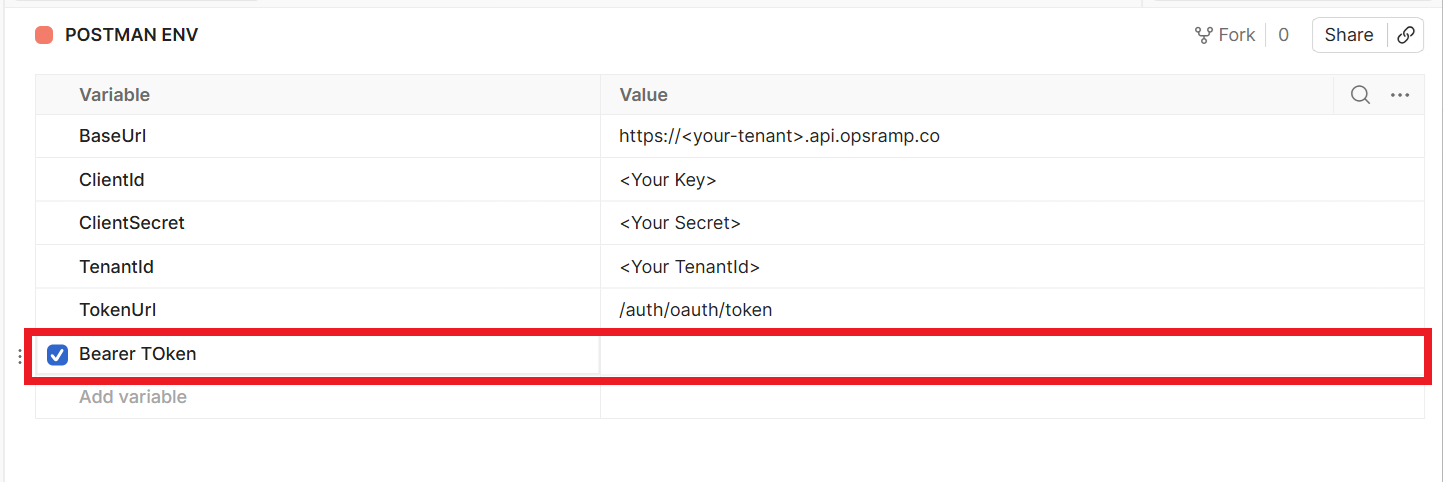
Define the current value of the collection variables to match your OpsRamp tenant context:
BaseUrl: This variable defines the base URL of your OpsRamp REST API requests. OpsRamp supports tenant-specific API endpoints and also custom-branded URLs. Use the API endpoint you noted from your custom integration or your tenant API base.
ClientId and ClientSecret: These variables must be set to the Key (ClientId) and Secret (ClientSecret) generated in your Custom Integration. They are used to request an OAuth access token using the client_credentials grant type.
TokenUrl: This variable is the OAuth token endpoint (Access Token URL) shown in your custom integration. Your internal guide shows this token endpoint as /auth/oauth/token on your POD URL.
TenantId: This variable is the tenant identifier used to scope API calls. In OpsRamp APIs, the tenant identifier appears in the path (for example, /api/v2/tenants/{clientId}/...).
BearerToken: Do not edit this variable manually. Keep it empty. It will be set automatically when you run the Generate Access Token request using a post-response script.
{
  "BaseUrl": "https://<your-tenant>.api.opsramp.com",
  "TokenUrl": "https://<PODname>/auth/oauth/token",
  "TenantId": "<Your TenantId>",
  "ClientId": "<Your Key>",
  "ClientSecret": "<Your Secret>",
  "BearerToken": ""
}
Note: Do not edit other variables. Keep them empty. The collection variables will be set automatically upon successful execution of REST API calls using Postman scripts.
Acquire an OAuth access token as your session bearer token
OpsRamp APIs use a bearer token as an authorization type to ensure that all REST API requests access authorized platform services securely. So, you first need to obtain a token from the OAuth authorization server before you can make any REST API calls to OpsRamp APIs. To do so, proceed as follows:
- From your collection, generate the token using the Generate Access Token request and click the Send button.
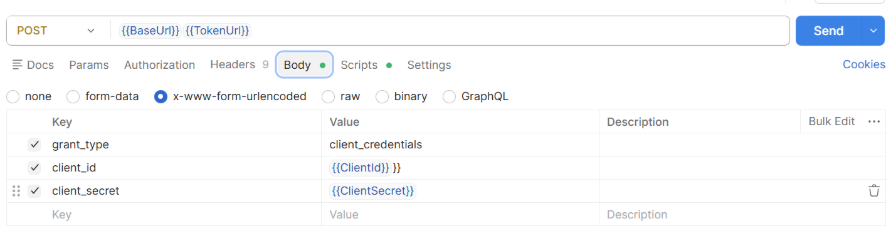
- Verify that you get a status code of 200 for a successful response with a token value in the response body. As you can see from the image below, I get a “200 OK” response code.

- The Generate Access Token request can define a post-response script in the Scripts tab (Postman Tests script) to programmatically set the collection variable BearerToken. The programmatically defined token is then used to authenticate any subsequent REST API calls.
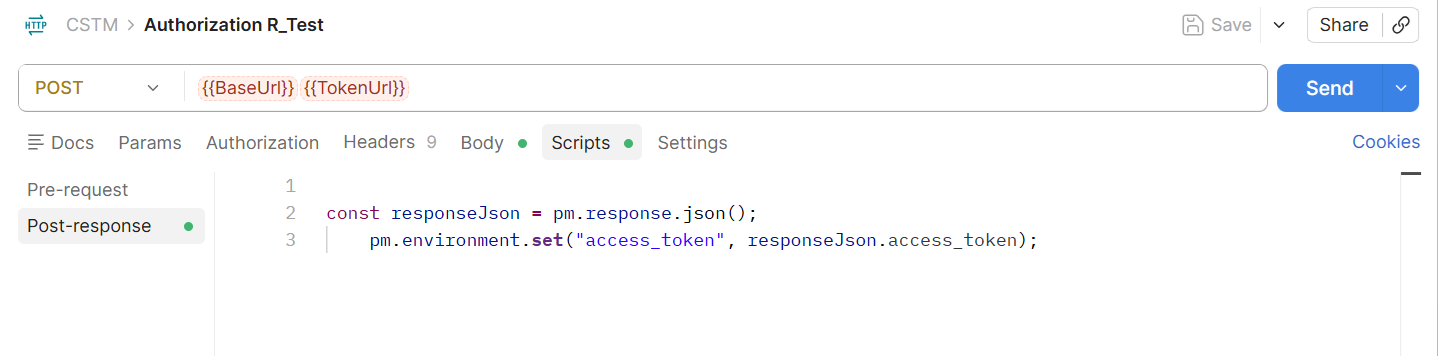
const jsonData = pm.response.json();
pm.collectionVariables.set("BearerToken", jsonData.access_token);
Note: Make sure you select Correct Environment while executing the Token API to get the variables properly.
Make subsequent secure REST API calls to OpsRamp platform services
All subsequent REST API requests are authenticated by presenting the access token as the authorization bearer token to OpsRamp APIs. The service validates the access token, and if valid, serves the request. In this blog post, the access token is validated by creating an alert using a single API call.
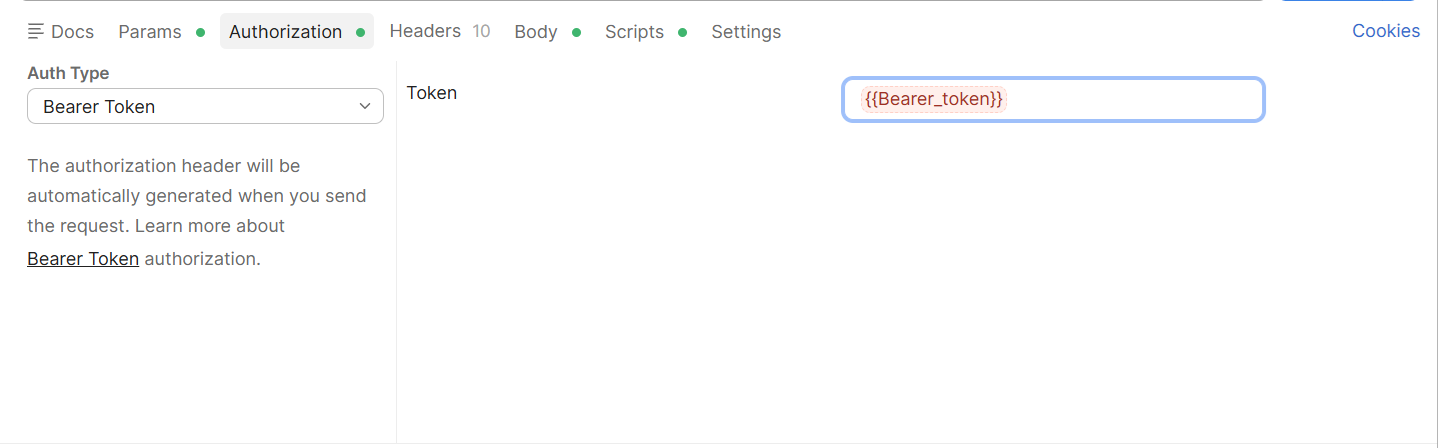
Example: Create an alert in OpsRamp using Postman
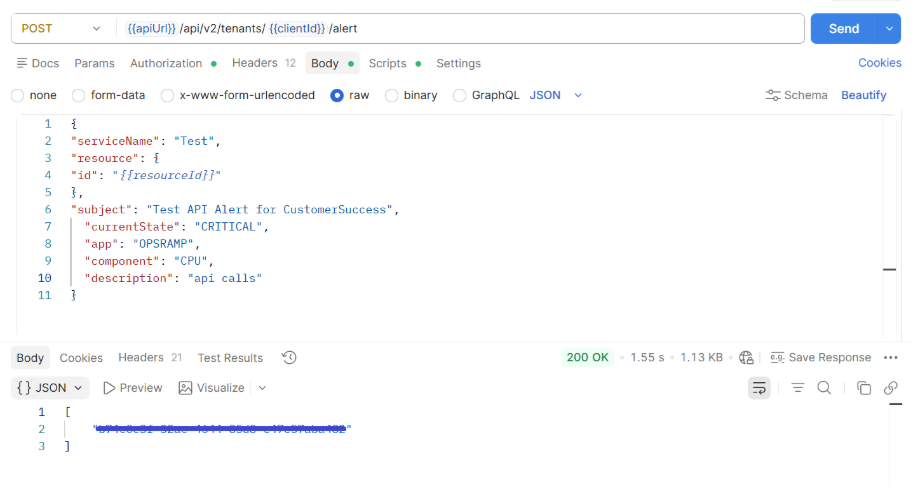
To create an alert in OpsRamp, use the Alerts API endpoint shown in the internal guide. Configure the request in Postman as follows.
- Method: POST
- Request URL: {{BaseUrl}}/api/v2/tenants/{{TenantId}}/alert
- Headers: Authorization: bearer {{BearerToken}}, Content-Type: application/json, Accept: application/json
In the Body tab, select raw → JSON and paste the following payload:
{
  "serviceName": "Postman",
  "device": {
    "id": "{{resourceId}}"
  },
  "subject": "Test API Alert for CustomerSuccess",
  "currentState": "CRITICAL",
  "app": "OPSRAMP",
  "component": "CPU",
  "description": "api calls"
}
Click Send. If successful, the API returns an identifier for the created alert: (Below is Dummy response)
  "0f53640b-d358-4b20-b896-f72ef7eb81cb"
]
Summary
This blog post describes the first step towards programmatically interacting with OpsRamp platform services. It shows how to generate API credentials using a custom integration configured with OAth2, define reusable Postman collection variables, and acquire an OAuth access token to securely authenticate the API requests. Using this foundation, you will be able to make your first subsequent secure REST API call to create an alert in OpsRamp and demonstrate how external systems can integrate directly with the platform for alert ingestion and automation. With this setup in place, you can extend your workflows further by integrating OpsRamp APIs into monitoring tools, automation pipelines, or external platforms for real-time operations and visibility.
Please keep coming back to the HPE Developer Community blog to learn more about HPE Opsramp and get more ideas on how you can use it in your everyday operations.
Related

An Overview of IT Service Management using HPE OpsRamp Service Desk
Jun 25, 2026
Automating HPE OpsRamp Software with Terraform: Infrastructure as Code for autonomous IT operations
May 25, 2026
How to Transform IT Operations with AI-Infused, Full-Stack Observability
Dec 2, 2024HPE OpsRamp Continues to Push Autonomous IT Operations Forward
Dec 2, 2024
Hybrid observability service – Part 1: Provisioning and activation in HPE GreenLake Flex Solutions
May 22, 2025Hybrid observability service – Part 2: Initial configuration to enable the discovery of resources in HPE GreenLake Flex Solutions
May 23, 2025Hybrid observability service – Part 3: Enabling the monitoring of agentless SSH-enabled systems in HPE GreenLake Flex Solutions
May 26, 2025