

Observe any observable using HPE OpsRamp: Open telemetry as the universal ingestion standard
March 30, 2026Part 1 of a series on vendor-neutral observability with HPE OpsRamp and OpenTelemetry
Introduction
I have spent considerable time thinking about a fundamental question in modern infrastructure management: what does it mean for a platform to be truly observable? Not just monitorable — but observable in the sense that any signal, from any source, using any open standard, can flow into a single management plane without vendor lock-in.
In this article, I want to share what I built to answer that question: a proof-of-concept that demonstrates how HPE OpsRamp can serve as a universal observability backend for any infrastructure domain, using OpenTelemetry as the sole ingestion standard. I will walk you through the objective, the architecture, every component in the stack, and exactly how they are wired together.
What is OpenTelemetry?
OpenTelemetry (OTel) is a CNCF open-source project that provides a vendor-neutral standard for collecting and exporting telemetry — metrics, logs, and traces — from any application or infrastructure component. It defines a common data model, APIs, SDKs, and a wire protocol (OTLP) that any observability backend can consume.
Rather than instrumenting your code differently for every monitoring tool, you instrument once with OpenTelemetry and route signals wherever you need them.
Project home: opentelemetry.io
By the end of this article you will understand the full picture — the what and the why. In subsequent articles I will go deeper into the how: installation, verification, testing, and signal ingestion.
The objective: Observe anything, from anywhere, using open standards
The central premise of this proof-of-concept is deceptively simple.
Before ingestion: HPE OpsRamp has no knowledge of the target infrastructure. No resources pre-created, no templates configured, no proprietary agents installed.
After ingestion: HPE OpsRamp automatically has a complete operational picture — resources with full domain attributes, topology relationships, live metrics, structured logs, distributed traces, and correlated alerts — all derived purely from OpenTelemetry signals.
The domain does not matter. I used Redfish — the DMTF standard for hardware management — purely as a convenient resource simulator. The same architecture works for Kubernetes workloads, VMware vSphere, bare-metal servers, IoT sensors, or any system that can emit OpenTelemetry signals. Redfish is the stand-in, not the subject.
The key constraint I imposed on myself: no HPE OpsRamp proprietary agents, no vendor-specific SDKs for signal collection, no webhook-based event ingestion. Everything flows through open standards.
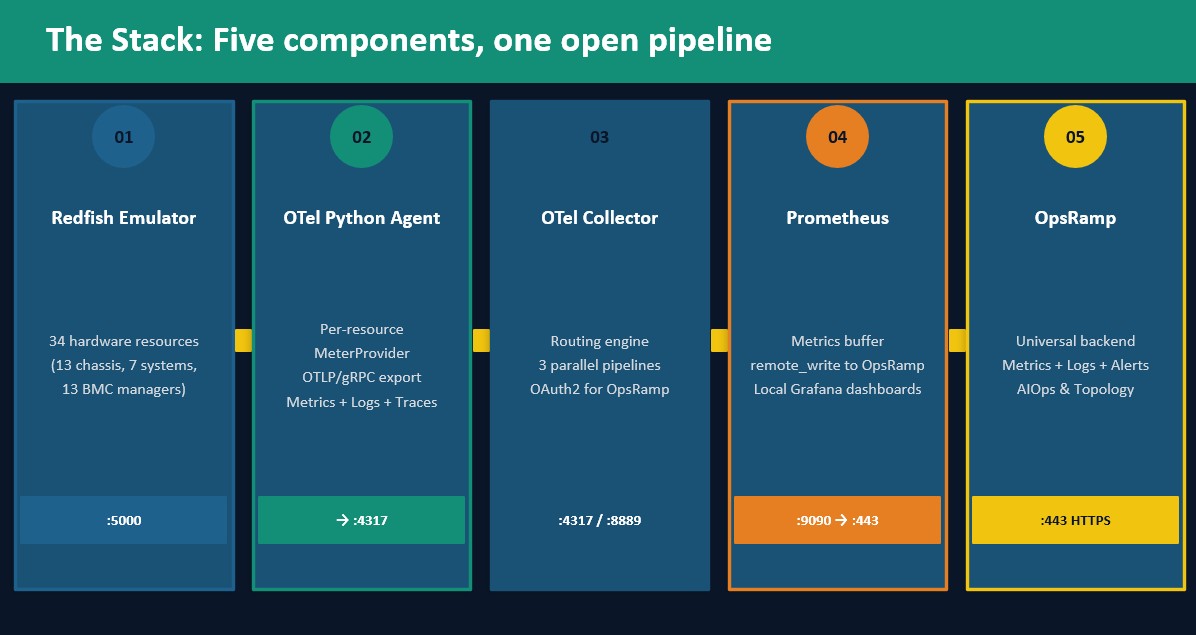
The stack: Five components, one open pipeline
The architecture consists of five components arranged in a clean signal pipeline. Let me introduce each one and explain its role before describing how they interconnect.
The DMTF Redfish emulator — resource simulation layer
The DMTF Redfish Interface Emulator is an open-source Python application that implements the Redfish API specification. It simulates a complete hardware infrastructure: 13 chassis, 7 compute systems, and 13 BMC managers — 34 resources in total — each exposing real Redfish endpoints for power consumption, thermal readings, fan speeds, memory, CPU, and hardware events.
I chose Redfish because it is a genuine industry standard used in real data centers, it produces rich structured data, and it runs entirely in Docker with no external dependencies. Every chassis exposes endpoints like /redfish/v1/Chassis/Chassis-1/Power and /redfish/v1/Chassis/Chassis-1/Thermal that return real numeric data suitable for metric collection.
The emulator runs on port 5000 and is the sole source of truth for infrastructure state in this stack.
The OTel Python agent — instrumentation layer
This is the custom Python application I wrote for this proof-of-concept. It is the heart of the open-standard ingestion story.
The agent uses the OpenTelemetry Python SDK to instrument Redfish polling in a way that produces three distinct signal types:
Metrics — The agent creates one MeterProvider per chassis and one per system. Each provider has its own Resource object carrying the chassis or system identity. Power consumption, thermal temperatures, fan speeds, memory, and CPU metrics are emitted as OTel gauge instruments with full resource context attached.
Logs and events — Redfish hardware events are captured as OTel LogRecord objects. Each log record carries the host.name of the originating resource, enabling HPE OpsRamp to associate the log with the correct resource entry. A separate LoggerProvider per resource ensures the association is precise.
Traces — Every poll cycle is wrapped in an OTel trace span using RequestsInstrumentor for automatic HTTP instrumentation. The trace waterfall shows exactly which Redfish API calls were made, their latency, and any errors — giving full visibility into the agent's operational behavior.
The agent sends all three signal types to the OTel Collector using OTLP/gRPC on port 4317.
The OTel Collector — processing and routing layer
The OpenTelemetry Collector is the central routing engine of the stack. It is the only component that speaks to both the local observability tools and HPE OpsRamp simultaneously.
The collector runs three parallel pipelines:
The metrics pipeline receives OTLP metrics from the agent and the httpcheck receiver, processes them through a resource attribute processor, and exports them to Prometheus on port 8889. Prometheus then pushes to HPE OpsRamp via remote_write.
The logs pipeline receives OTLP log records from both the agent and the event listener, batches them for efficiency, and exports them directly to HPE OpsRamp's log ingestion endpoint using OTLP/gRPC with OAuth2 authentication managed by the oauth2client extension.
The traces pipeline receives OTLP spans and exports them to Jaeger for local visualization.
The Collector also runs the httpcheck receiver — a built-in receiver that polls the Redfish API endpoints directly, producing endpoint health metrics (up/down status and response time) without any agent code.
Prometheus — metrics buffering and remote write
Prometheus serves a dual purpose in this stack. Locally, it provides a queryable time-series database that Grafana uses for dashboards. Remotely, it acts as the push mechanism for metrics into HPE OpsRamp via remote_write — HPE OpsRamp's recommended ingestion path for Prometheus-format metrics.
The remote_write configuration in prometheus.yml includes the HPE OpsRamp endpoint, OAuth2 credentials, and the critical resource association labels: type="RESOURCE" and uuid="<resourceUUID>" that tell HPE OpsRamp which managed resource each metric belongs to.
HPE OpsRamp — the observability backend
HPE OpsRamp is the management plane that consumes all signals and provides the operational intelligence layer: resource lifecycle management, topology visualization, metric correlation, log management, alert generation, and AIOps capabilities.
HPE OpsRamp is not configured in advance for this domain. It learns everything about the Redfish infrastructure from the signals it receives, augmented by a one-time resource provisioning step that uses the HPE OpsRamp REST API to create resource entries with full domain attributes before telemetry begins.
The communication map: How everything is wired
Understanding the signal flow is essential before diving into installation and code. Here is the complete communication topology.
Signal flow: Metrics
Redfish Emulator :5000
      │  HTTP GET (every 15s)
      ▼
OTel Agent (agent.py)
      │  OTLP/gRPC :4317  (metrics per chassis/system)
      ▼
OTel Collector :4317
      │  Prometheus exporter :8889
      ▼
Prometheus :9090
      │  remote_write HTTPS
      │  Authorization: Bearer <token>
      │  labels: type="RESOURCE", uuid="<resourceUUID>"
      ▼
HPE OpsRamp Metrics Explorer
Signal flow: Logs and events
Redfish Emulator :5000
      │  HTTP GET (EventService polling)
      │  HTTP POST (event push to :9999)
      ▼
Event Listener (event_listener.py)
      │  OTLP/gRPC :4317  (LogRecords with host.name, type, uuid)
      ▼
OTel Collector :4317
      │  OTLP/gRPC :443  (batched, gzip compressed)
      │  Authorization: Bearer <oauth2 token>
      │  Header: tenantId: <tenantId>
      ▼
HPE OpsRamp Log Management
Signal flow: Traces
OTel Agent (RequestsInstrumentor auto-instrumentation)
      │  OTLP/gRPC :4317  (spans for every HTTP call)
      ▼
OTel Collector :4317
      │  OTLP/gRPC to Jaeger :14317
      ▼
Jaeger UI :16686
Signal flow: Resource provisioning
HPE OpsRamp REST API (one-time, on agent startup)
      │  POST /tenancy/auth/oauth/token  →  Bearer token
      │  POST /api/v2/tenants/{id}/resources  →  resourceUUID per resource
      │  POST /api/v2/tenants/{id}/topologies  →  parent-child relationships
      ▼
ResourceContext (in-memory registry: hostname → uuid)
      │
      ▼
All subsequent OTel signals carry: type="RESOURCE", uuid="<resourceUUID>"
Operational protocols
Hop | Protocol | Port | Auth | Direction |
| Agent → Collector | OTLP/gRPC | 4317 | None (same host) | Push |
| Collector → HPE OpsRamp logs | OTLP/gRPC | 443 | OAuth2 Bearer | Push |
| Prometheus → HPE OpsRamp metrics | HTTPS remote_write | 443 | OAuth2 Bearer | Push |
| Collector httpcheck → Redfish | HTTP | 5000 | None | Pull |
| Agent → Redfish | HTTP | 5000 | None | Pull |
| HPE OpsRamp REST API | HTTPS | 443 | OAuth2 Bearer | Push |
The resource association problem and how I solved it
This deserves special attention because it is the most important design decision in the entire stack.
HPE OpsRamp can receive metrics and logs as raw telemetry and display them in its explorer views. But to associate those signals with a specific managed resource — to show them in the resource's Metrics tab or Logs tab, and to enable topology-aware correlation — HPE OpsRamp requires two mandatory attributes on every signal:
type = "RESOURCE"
uuid = "5ce1fab8-b706-46bc-8941-47eb32a8f571"
The type must be exactly the string "RESOURCE" in uppercase. The uuid must be the resourceUUID that HPE OpsRamp assigned when the resource was created via its REST API.
I solved this with a module called resource_context.py — a shared in-memory registry that maps each resource hostname to its full identity attributes. Phase 1 (provisioning) populates this registry. Phase 2 (telemetry) reads from it to enrich every metric data point, log record, and trace span.
The critical timing constraint is that agent_resource — the OTel Resource object for the agent — must be constructed after Phase 1 completes, not at module import time. If built at import time, the registry is empty and uuid is an empty string. This is a subtle but consequential bug I had to identify and fix explicitly.
The observability stack in context
What makes this architecture compelling for a demonstration is not any single component — it is the combination. Each component is an open standard or open-source tool:
- Redfish — DMTF open standard for hardware management
- OpenTelemetry — CNCF open standard for telemetry
- Prometheus — CNCF open-source metrics engine
- Jaeger — CNCF open-source distributed tracing
- Grafana — Open-source visualization
- HPE OpsRamp — Commercial management plane consuming all of the above
The PoC demonstrates that HPE OpsRamp can serve as the observability backend for any infrastructure domain instrumented with OpenTelemetry, without requiring its proprietary agents for signal collection. The ingestion path is fully open standard.
Conclusion and what comes next
I have laid out the full architecture — the components, the signal flows, the protocols, and the resource association mechanism. The picture should be clear: any infrastructure domain that can be instrumented with OpenTelemetry can be observed in HPE OpsRamp using this pattern.
In Part 2, I will walk through the complete installation and verification of every component in the local stack — the Redfish emulator, OTel Collector, Prometheus, Grafana, and Jaeger — running in Docker Compose on a single EC2 instance. I will show exactly how to verify each component is healthy before sending a single signal to HPE OpsRamp.
Stay tuned to the HPE Developer Community blog for more insights on HPE HPE OpsRamp (Hybrid Cloud Observability) and practical ideas to apply it in your daily operations.
Want to know more?
- OpenTelemetry project: opentelemetry.io
- OTel specification: opentelemetry.io/docs/specs/otel
- OTel Python SDK: opentelemetry-python.readthedocs.io
- OTel Collector: opentelemetry.io/docs/collector
- OTLP protocol: opentelemetry.io/docs/specs/otlp
- DMTF Redfish standard: dmtf.org/standards/redfish
- Redfish emulator: github.com/DMTF/Redfish-Interface-Emulator
- HPE OpsRamp OTLP integration: docs.opsramp.com
- Prometheus remote_write: prometheus.io/docs
- Jaeger tracing: jaegertracing.io
Related
Observe any observable using HPE OpsRamp — Part 2: Setting up the stack
Apr 17, 2026
Automating application deployments to MKS clusters using GitOps with Argo CD
Jan 13, 2026
Automating HPE OpsRamp Software with Terraform: Infrastructure as Code for autonomous IT operations
May 25, 2026
Build your first AI Chatbot on HPE Private Cloud AI using Flowise and HPE MLIS
Jul 11, 2025
Bulk onboarding of users in HPE GreenLake edge-to-cloud platform
Apr 24, 2024
How to configure iSUT and AMS for vLCM-Based firmware updates on HPE Gen12 servers (High Security Mode)
Aug 4, 2025
Configuring Azure Active Directory with long-lived tokens for user provisioning
Jul 16, 2024