

Simplifying permission management using Kubernetes ClusterRole aggregation in HPE Private Cloud AI
February 17, 2026When operating Kubernetes (K8s), Role‑Based Access Control (RBAC) serves as a foundational security mechanism, mapping users and workloads to define permissions and enforcing the principle of least privilege. However, as clusters evolve and new access requirements arise, managing K8s Roles and ClusterRoles through manual updates becomes increasingly difficult and error-prone.
This blog post introduces ClusterRole aggregation as an effective way to simplify that challenge. It explains the key concepts and advantages of aggregated ClusterRoles and shows how they streamline permission management by reducing manual RBAC updates on existing roles. The post also provides practical examples of applying ClusterRole aggregation in the HPE Private Cloud AI (PCAI) environment, demonstrating how this approach makes RBAC administration more scalable, maintainable, and efficient.
What is K8s RBAC?
K8s RBAC is a native authorization framework integrated directly into the K8s API server. It is composed of four primary object types: Roles, which define permissions for namespaced resources; ClusterRoles, which define permissions at the cluster scope; RoleBindings, which associate a role with a user, group, or ServiceAccount within a specific namespace; and ClusterRoleBindings, which bind subjects to a ClusterRole across the entire cluster. Together, these constructs provide fine‑grained, declarative control over resource access and enforce least-privilege authorization across the environment.
Despite its flexibility, K8s RBAC introduces several operational challenges, largely due to its mixed namespace and cluster-scoped permission model. Because RBAC permissions must span both namespaced and global resources, teams often struggle to maintain strict least‑privilege boundaries without resorting to overly broad ClusterRoles, raising the risk of misconfiguration and privilege escalation. The high granularity of K8s API resources and verbs, combined with the separation of Roles/ClusterRoles from their bindings, makes it difficult to understand the effective permissions granted to a subject. As multiple teams modify RBAC objects over time, policies tend to drift, accumulate inconsistencies, and unintentionally propagate privileges through shared bindings. In large-scale environments such as PCAI, K8s RBAC management becomes complex, error‑prone, and operationally fragile.
To address these challenges as environments grow and the number of roles increases, K8s provides ClusterRole aggregation, a mechanism designed to simplify and streamline permission management across the cluster.
What is ClusterRole aggregation?
ClusterRole aggregation, introduced in K8s v1.9, is a mechanism that automatically aggregates several ClusterRoles into one combined ClusterRole based on label selectors. A controller, running in the cluster control plane, watches for ClusterRole objects that define an aggregationRule section. This rule specifies a set of label selectors that the controller uses to match other ClusterRoles whose rules should be merged into the rules field of the aggregated ClusterRole. The resulting ClusterRole is dynamically constructed by combining the permissions of all matching rules.
K8s ships with several built-in user-facing roles, such as view, edit and admin, implemented using this aggregation mechanism. These default roles represent common permission tiers, ranging from ready-only access to full namespac-level administrative capabilities. They are automatically assembled by the controller using labels of the form 'rbac.authorization.k8s.io/aggregate-to-'.
When additional permissions are required, cluster administrators can define them as standalone ClusterRoles and apply the appropriate label. The controller will automatically incorporate these roles into the corresponding aggregated roles (e.g., edit, view), eliminating the need to manually modify existing ClusterRoles whenever new access requirements arise. This approach shifts the operational focus toward managing small, purpose‑specific roles that are automatically composed into higher‑level permission sets, making RBAC policy management more scalable, maintainable, and efficient.
The following sections will show you some practical examples of permission management using ClusterRole aggregation in the HPE PCAI environment.
HPE Private Cloud AI
HPE Private Cloud AI (PCAI) is a turnkey, enterprise‑ready platform that integrates HPE and NVIDIA technologies to simplify and accelerate AI workload deployment on a K8s foundation. By leveraging standard K8s constructs, PCAI deploys AI models, inference services, and supporting AI/ML components into dedicated K8s namespaces, ensuring clean resource separation, scalability, and lifecycle management.
As part of its user‑centric design, PCAI automatically provisions a default Jupyter notebook environment for each authenticated user. This Jupyter notebook runs as a containerized Pod within the user’s personal K8s namespace, providing an isolated workspace for experimentation, data preparation, and model development.
Kubeflow Notebooks
As part of the pre‑integrated toolset in PCAI, Kubeflow is deployed along with its associated custom resource definitions (CRDs) and built‑in ClusterRoles. These ClusterRoles follow K8s standard role patterns, kubeflow-view, kubeflow-edit, and kubeflow-admin, and can be assigned by cluster administrators to users or ServiceAccounts to manage access control within the cluster.
# kubectl get clusterroles | grep -e "kubeflow-edit" -e "kubeflow-view" -e "kubeflow-admin"
kubeflow-admin                                                         2025-11-20T03:25:34Z
kubeflow-edit                                                          2025-11-20T03:25:34Z
kubeflow-view                                                          2025-11-20T03:25:34Z
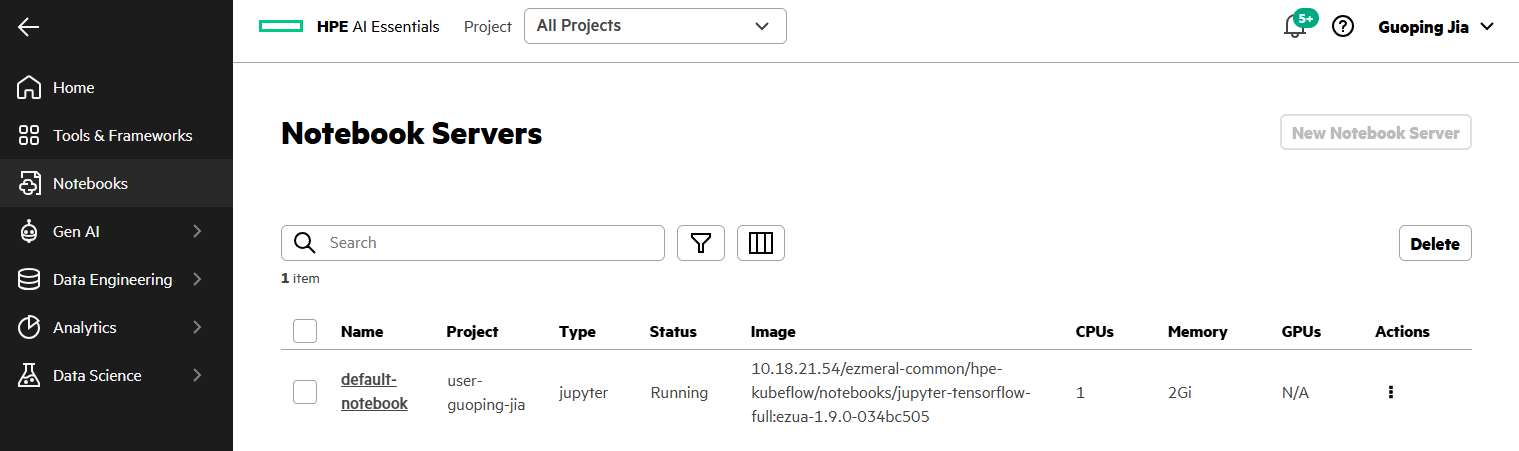
When a user logs into PCAI, a default Jupyter notebook named 'default-notebook' is already available under Notebook Servers. This Jupyter notebook is pre-created using the tensorflow image through Kubeflow Notebooks and is deployed within the user's dedicated project namespace, such as 'project-user-guoping-jia'.
Within this namespace, a RoleBinding named 'default-editor' associates the ServiceAccount 'default-editor' with the Kubeflow ClusterRole 'kubeflow-edit'. This ClusterRole grants the standard set of permissions required for typical Kubeflow operations.
# kubectl get serviceaccount -n project-user-guoping-jia default-editor
NAME                      SECRETS   AGE

default-editor            0         24d

# kubectl get rolebinding -n project-user-guoping-jia default-editor
NAME                       ROLE                                   AGE
default-editor             ClusterRole/kubeflow-edit              24d
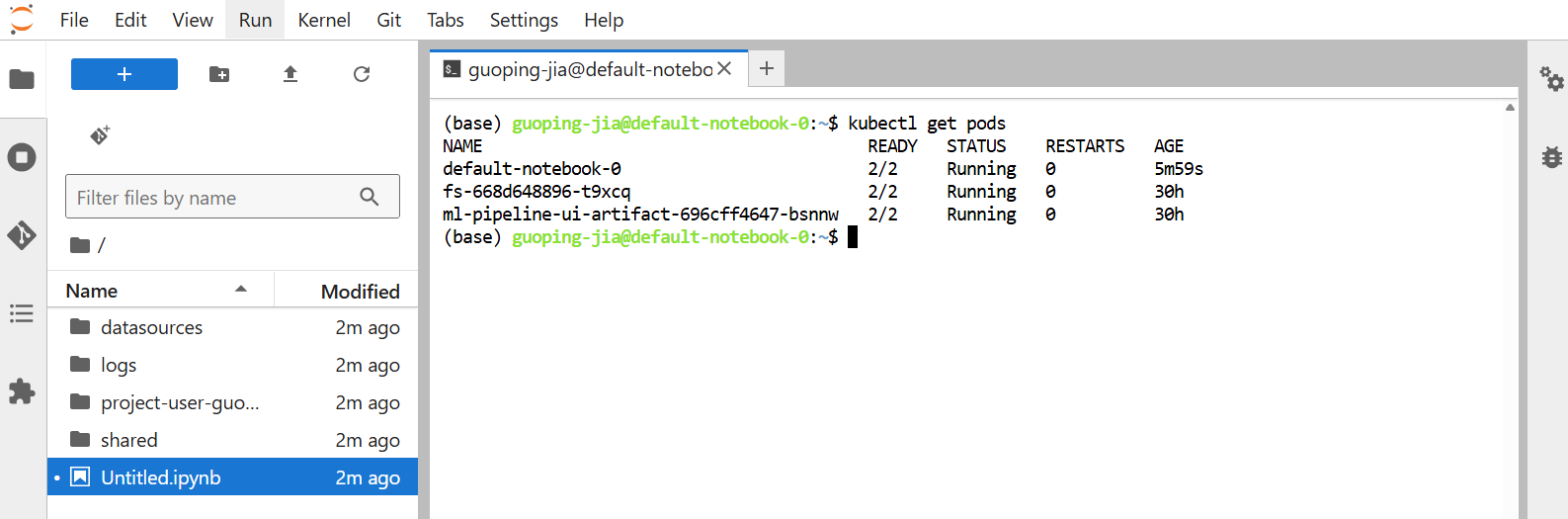
With this default RoleBinding in place, the user obtains the 'kubeflow-edit' permissions within the namespace and can run kubectl commands from the Jupyter notebook terminal to access most K8s objects, including Pods, Deployments, Services, and more.
Permission restriction in Jupyter notebooks
While the user can access most K8s objects in the project namespace, certain operations remain restricted. For example, they cannot list all Secrets or perform privileged actions such as executing commands inside a running Pod’s container. These elevated permissions are sometimes necessary, for instance, when verifying private container image configurations that rely on specific Secrets or when troubleshooting issues in a failed Pod.
(base) guoping-jia@default-notebook-0:~$ kubectl auth can-i list secrets
no
(base) guoping-jia@default-notebook-0:~$ kubectl auth can-i get pods --subresource=exec
no
(base) guoping-jia@default-notebook-0:~$ kubectl get secrets
Error from server (Forbidden): secrets is forbidden: User "system:serviceaccount:project-user-guoping-jia:default-editor" cannot list resource "secrets" in API group "" in the namespace "project-user-guoping-jia"
(base) guoping-jia@default-notebook-0:~$ kubectl exec -it default-notebook-0 -- sh
Error from server (Forbidden): pods "default-notebook-0" is forbidden: User "system:serviceaccount:project-user-guoping-jia:default-editor" cannot create resource "pods/exec" in API group "" in the namespace "project-user-guoping-jia"
Permission management for Jupyter notebook terminal access
This section explains how to grant additional permissions in a Jupyter notebook environment using ClusterRole aggregation to simplify RBAC permission management.
Considering the fact that the ClusterRole 'kubeflow-edit' is bound to the ServiceAccount of every authenticated PCAI user, modifying this shared ClusterRole to add additional permissions is not an appropriate approach. Doing so would grant all users elevated privileges in their Jupyter notebooks, which violates the principle of least privilege.
Granting additional permissions
Rather than modifying the existing Kubeflow ClusterRoles, this section describes how to create a custom aggregated ClusterRole that can be easily extended by combining multiple smaller, purpose-specific ClusterRoles.
All ClusterRole and RoleBinding YAML manifests referenced here are available in my GitHub repository. If you plan to configure this for your Jupyter notebook environment, remember to replace the project's user namespace with your own.
- Create an aggregated ClusterRole
Create the following aggregated ClusterRole named 'custom-kubeflow-edit'.
# cat custom-kubeflow-edit.yaml
apiVersion: rbac.authorization.k8s.io/v1
kind: ClusterRole
metadata:
  name: custom-kubeflow-edit
aggregationRule:
  clusterRoleSelectors:
  - matchLabels:
      rbac.authorization.kubeflow.org/aggregate-to-custom-kubeflow-edit: "true"
rules: []

# kubectl apply -f custom-kubeflow-edit.yaml
clusterrole.rbac.authorization.k8s.io/custom-kubeflow-edit created

# kubectl get clusterroles custom-kubeflow-edit
NAME                   CREATED AT
custom-kubeflow-edit   2026-02-17T10:43:00Z
Notice that the 'rules' field in this aggregated ClusterRole is intentionally left empty, with only the label 'rbac.authorization.kubeflow.org/aggregate-to-custom-kubeflow-edit: "true"' defined. The control plane automatically fills the 'rules' field by merging permissions from other ClusterRoles that match this label. Any rules you manually add to an aggregated ClusterRole will be overwritten. To modify or extend permissions, you must update or create the individual ClusterRole objects selected by the aggregation label.
Run the following command to inspect the 'rules' section of the deployed ClusterRole 'custom-kubeflow-edit'.
# kubectl get clusterrole custom-kubeflow-edit -o jsonpath='{.rules}' | jq .
null
- Create a focused ClusterRole 'custom-list-secrets' to grant permission for listing Secrets.
# cat custom-list-secrets.yaml
apiVersion: rbac.authorization.k8s.io/v1
kind: ClusterRole
metadata:
  name: custom-list-secret
  labels:
    rbac.authorization.kubeflow.org/aggregate-to-custom-kubeflow-edit: "true"
rules:
  - apiGroups:
    - ""
    resources:
    - secrets
    verbs:
    - get
    - list

# kubectl apply -f custom-list-secrets.yaml
clusterrole.rbac.authorization.k8s.io/custom-list-secret created
The ClusterRole includes the label 'rbac.authorization.kubeflow.org/aggregate-to-custom-kubeflow-edit: "true"'.
Run the following command to verify that permission to list Secrets has been incorporated and merged into the aggregated ClusterRole 'custom-kubeflow-edit'.
# kubectl get clusterrole custom-kubeflow-edit -o jsonpath='{.rules}' | jq .
[
  {
    "apiGroups": [
      ""
    ],
    "resources": [
      "secrets"
    ],
    "verbs": [
      "get",
      "list"
    ]
  }
]
- Create another focused ClusterRole 'custom-exec-pods' to grant permission for executing commands inside a running Pod's container.
# cat custom-exec-pods.yaml
apiVersion: rbac.authorization.k8s.io/v1
kind: ClusterRole
metadata:
  name: custom-exec-pods
  labels:
    rbac.authorization.kubeflow.org/aggregate-to-custom-kubeflow-edit: "true"
rules:
  - apiGroups:
    - "*"
    resources:
    - pods/exec
    verbs:
    - "*"

# kubectl apply -f custom-exec-pods.yaml
clusterrole.rbac.authorization.k8s.io/custom-exec-pods created
Run the following command to verify that the exec-command permissions have also been incorporated and merged into the aggregated ClusterRole 'custom-kubeflow-edit'.
# kubectl get clusterrole custom-kubeflow-edit -o jsonpath='{.rules}
' | jq .
[
  {
    "apiGroups": [
      "*"
    ],
    "resources": [
      "pods/exec"
    ],
    "verbs": [
      "*"
    ]
  },
  {
    "apiGroups": [
      ""
    ],
    "resources": [
      "secrets"
    ],
    "verbs": [
      "get",
      "list"
    ]
  }
]
- Create a custom RoleBinding named 'custom-editor' to bind the aggregated ClusterRole 'custom-kubeflow-edit' to the ServiceAccount 'default-editor' in the user namespace 'project-user-guoping-jia'.
# cat custom-rolebinding.yaml
apiVersion: rbac.authorization.k8s.io/v1
kind: RoleBinding
metadata:
  name: custom-editor
  namespace: project-user-guoping-jia
roleRef:
  apiGroup: rbac.authorization.k8s.io
  kind: ClusterRole
  name: custom-kubeflow-edit
subjects:
- kind: ServiceAccount
  name: default-editor
  namespace: project-user-guoping-jia

# kubectl apply -f custom-rolebinding.yaml
rolebinding.rbac.authorization.k8s.io/custom-editor created

# kubectl get rolebinding -n project-user-guoping-jia custom-editor
NAME            ROLE                               AGE
custom-editor   ClusterRole/custom-kubeflow-edit   84s                                                 2026-02-17T10:43:00Z
- Verify the added permissions
From the Jupyter notebook terminal, you should now be able to list Secrets and execute bash commands inside a running Pod's container within the namespace.
(base) guoping-jia@default-notebook-0:~$ kubectl auth can-i list secrets
yes
(base) guoping-jia@default-notebook-0:~$ kubectl auth can-i get pods --subresource=exec
yes


(base) guoping-jia@default-notebook-0:~$ kubectl get secrets
NAME                    TYPE                             DATA   AGE
access-token            Opaque                           1      24d
af-cluster-airflowui    Opaque                           6      24d
hpe-imagepull-secrets   kubernetes.io/dockerconfigjson   1      24d
imagepull               kubernetes.io/dockerconfigjson   1      24d
ngc-cli-secret          Opaque                           2      24d
(base) guoping-jia@default-notebook-0:~$ kubectl get pods
NAME                                       READY   STATUS    RESTARTS   AGE
default-notebook-0                         2/2     Running   0          45h
fs-65cbb7b876-x9564                        2/2     Running   0          24d
ml-pipeline-ui-artifact-696cff4647-46slx   2/2     Running   0          24d
(base) guoping-jia@default-notebook-0:~$ kubectl exec -it default-notebook-0 -- bash
root@default-notebook-0:/# pwd
/
root@default-notebook-0:/# exit
exit
(base) guoping-jia@default-notebook-0:~$
Granting user access to other namespaces
As another practical example of permission management, this section covers a more advanced requirement: granting a user access to a namespace other than their default one. In this additional namespace, where AI applications may be deployed, for example through the PCAI Import Framework, the user may need access for debugging or inspection.
By default, the ClusterRole and RoleBinding configuration applied in the Jupyter notebook environment restricts each authenticated user to their own namespace. They cannot access other namespaces, such as 'custom-ns', unless additional permissions are explicitly granted.
# kubectl create ns custom-ns
namespace/custom-ns created
# kubectl get ns custom-ns
custom-ns                               Active   3s
The following error appears when attempting to access the newly created namespace from the Jupyter notebook terminal.
(base) guoping-jia@default-notebook-0:~$ kubectl get ns custom-ns
Error from server (Forbidden): namespaces "custom-ns" is forbidden: User "system:serviceaccount:project-user-guoping-jia:default-editor" cannot get resource "namespaces" in API group "" in the namespace "custom-ns"
(base) guoping-jia@default-notebook-0:~$ kubectl get pods -n custom-ns
Error from server (Forbidden): pods is forbidden: User "system:serviceaccount:project-user-guoping-jia:default-editor" cannot list resource "pods" in API group "" in the namespace "custom-ns"
User access to the other namespace can be granted by creating a RoleBinding named 'default-editor'.
# cat ns-default-editor.yaml
apiVersion: rbac.authorization.k8s.io/v1
kind: RoleBinding
metadata:
  name: default-editor
  namespace: custom-ns
roleRef:
  apiGroup: rbac.authorization.k8s.io
  kind: ClusterRole
  name: kubeflow-edit
subjects:
- kind: ServiceAccount
  name: default-editor
  namespace: project-user-guoping-jia


# kubectl apply -f ns-default-editor.yaml
rolebinding.rbac.authorization.k8s.io/default-editor created


# kubectl get rolebinding -n custom-ns
NAME             ROLE                        AGE
default-editor   ClusterRole/kubeflow-edit   10s
The RoleBinding 'default-editor' binds the Kubeflow ClusterRole kubeflow-edit to the ServiceAccount default-editor in the namespace custom-ns.
Run the following commands to verify that the user can now access the namespace 'custom-ns'.
(base) guoping-jia@default-notebook-0:~$ kubectl get ns custom-ns
NAME        STATUS   AGE
custom-ns   Active   13m
However, with the default RoleBinding 'default-editor' in place, the user still cannot list Secrets in the namespace 'custom-ns', nor can they execute the commands inside any running Pod's container within that namespace.
(base) guoping-jia@default-notebook-0:~$ kubectl auth can-i list secrets -n custom-ns
no
(base) guoping-jia@default-notebook-0:~$ kubectl get secrets -n custom-ns
Error from server (Forbidden): secrets is forbidden: User "system:serviceaccount:project-user-guoping-jia:default-editor" cannot list resource "secrets" in API group "" in the namespace "custom-ns"
(base) guoping-jia@default-notebook-0:~$ kubectl auth can-i get pods --subresource=exec -n custom-ns
no
(base) guoping-jia@default-notebook-0:~$ kubectl exec -it mybox-84bdf9578-b6tkh -n custom-ns -- bash
Error from server (Forbidden): pods "mybox-84bdf9578-b6tkh" is forbidden: User "system:serviceaccount:project-user-guoping-jia:default-editor" cannot create resource "pods/exec" in API group "" in the namespace "custom-ns"
These additional permissions can be granted in the namespace 'custom-ns' by creating another RoleBinding named 'custom-editor'.
# cat ns-custom-editor.yaml
apiVersion: rbac.authorization.k8s.io/v1
kind: RoleBinding
metadata:
  name: custom-editor
  namespace: custom-ns
roleRef:
  apiGroup: rbac.authorization.k8s.io
  kind: ClusterRole
  name: custom-kubeflow-edit
subjects:
- kind: ServiceAccount
  name: default-editor
  namespace: project-user-guoping-jia


# kubectl apply -f ns-custom-editor.yaml
rolebinding.rbac.authorization.k8s.io/custom-editor created


# kubectl get rolebinding -n custom-ns
NAME             ROLE                               AGE
custom-editor    ClusterRole/custom-kubeflow-edit   8s
default-editor   ClusterRole/kubeflow-edit          12m
The RoleBinding 'custom-editor' binds the aggregated ClusterRole 'custom-kubeflow-edit', created in the previous section, to the ServiceAccount 'default-editor' in the namespace 'custom-ns'.
With the RoleBinding 'custom-editor' in place, and with 'custom-kubeflow-edit' ClusterRole already incorporating the two additional permissions, you can now verify that both listing Secrets and executing a bash command inside a running Pod's container work as expected in the namespace 'custom-ns'.
(base) guoping-jia@default-notebook-0:~$ kubectl auth can-i list secrets -n custom-ns
yes
(base) guoping-jia@default-notebook-0:~$ kubectl auth can-i get pods --subresource=exec -n custom-ns
yes


(base) guoping-jia@default-notebook-0:~$ kubectl create deploy nginx -n custom-ns --image=nginx
deployment.apps/nginx created
(base) guoping-jia@default-notebook-0:~$ kubectl get pods -n custom-ns
NAME                     READY   STATUS    RESTARTS   AGE
nginx-5869d7778c-b4tcw   1/1     Running   0          56s
(base) guoping-jia@default-notebook-0:~$ kubectl exec -it nginx-5869d7778c-b4tcw -n custom-ns -- bash
root@nginx-5869d7778c-b4tcw:/# ls -al
total 4
drwxr-xr-x.    1 root root   39 Feb  5 14:49 .
drwxr-xr-x.    1 root root   39 Feb  5 14:49 ..
lrwxrwxrwx.    1 root root    7 Jan  2 12:35 bin -> usr/bin
drwxr-xr-x.    2 root root    6 Jan  2 12:35 boot
drwxr-xr-x     5 root root  360 Feb  5 14:49 dev

drwxr-xr-x.    1 root root   32 Feb  5 14:49 etc
drwxr-xr-x.    2 root root    6 Jan  2 12:35 home
lrwxrwxrwx.    1 root root    7 Jan  2 12:35 lib -> usr/lib
lrwxrwxrwx.    1 root root    9 Jan  2 12:35 lib64 -> usr/lib64

drwxr-xr-x.    2 root root    6 Feb  2 00:00 mnt
drwxr-xr-x.    2 root root    6 Feb  2 00:00 opt
dr-xr-xr-x. 3149 root root    0 Feb  5 14:49 proc
drwx------.    2 root root   37 Feb  2 00:00 root

lrwxrwxrwx.    1 root root    8 Jan  2 12:35 sbin -> usr/sbin
drwxr-xr-x.    2 root root    6 Feb  2 00:00 srv
dr-xr-xr-x.   13 root root    0 Nov 14 17:04 sys
drwxrwxrwt.    2 root root    6 Feb  2 00:00 tmp
drwxr-xr-x.    1 root root   66 Feb  2 00:00 usr
drwxr-xr-x.    1 root root   19 Feb  2 00:00 var
root@nginx-5869d7778c-b4tcw:/# exit
exit
(base) guoping-jia@default-notebook-0:~$
If additional permission are needed in the namespace, you can follow the same approach by defining a purpose-specific ClusterRole with the appropriate aggregation label. Once the ClusterRole is applied, its permissions will be automatically merged into the aggregated ClusterRole.
Conclusion
This blog post explored and demonstrated how permission management for accessing K8s resources in the HPE Private Cloud AI environment can be simplified and streamlined through ClusterRole aggregation. When additional permissions are required, they can be defined as independent, purpose‑built ClusterRoles, which are then automatically incorporated into an aggregated ClusterRole by applying the appropriate labels. This approach eliminates the need to modify existing ClusterRoles for each new permission request and significantly reduces RBAC maintenance overhead. By relying on smaller, focused roles that aggregates cleanly, permission management becomes more flexible, scalable, and easier to maintain.
Please keep coming back to the HPE Developer Community blog to learn more about HPE Private Cloud AI and get more ideas on how you can use it in your everyday operations.
Tags
Related

Beyond generic AI: achieve contextual accuracy with HPE's Knowledge Bases
Apr 15, 2025
Build your first AI Chatbot on HPE Private Cloud AI using Flowise and HPE MLIS
Jul 11, 2025
Getting started with Retrieval Augmented Generation (RAG)
Nov 14, 2024
HPE Private Cloud AI: Natural Language to Structured Query Language
May 6, 2026Implementing a local LLM using S3-based model storage and vLLM in HPE Private Cloud AI
Mar 17, 2026Integrating Dagster as a modern data orchestration framework in HPE Private Cloud AI
Apr 19, 2026
LLM observability and cost management on HPE Private Cloud AI
Mar 6, 2026