
What if your AI ran next to your data instead of in a distant data center? Here’s how I split the workload: inference runs on a GPU workstation, while retrieval runs on a ProLiant MicroServer to build a private AI system at home.
AI is remarkably easy to access now: I can open a browser, type a question, and an answer appears. But I kept wondering what would happen if I brought the AI closer to where my own data actually lives.
That question led me to build a private, local setup from hardware I already own. I wanted to learn how inference, document retrieval, storage, and network controls could work together, not just whether a model would run on a PC.
I split the work across two machines: Mimir, my GPU-equipped Linux system, and Fafnir, an HPE ProLiant MicroServer Gen10 Plus running Unraid. Mimir handles inference; Fafnir provides storage and persistent application services.
I’m building it incrementally rather pretending I knew the final architecture before I started. This is a record of the work as it develops: which choices hold up, which change, and what it takes to make private local AI useful.
Why a private AI edge architecture?
Cloud AI has enormous advantages. The largest models and the infrastructure behind them aren’t things I’m going to reproduce in my house, but that’s not really the point.
Local AI offers a different set of potential advantages: control, availability during internet outages, lower network dependency, potentially reduced costs, and the option to bring a model to local data rather than routinely sending that data to a remote service. Those benefits depend on how the system is configured; local hosting alone does not guarantee privacy or security.
That is fundamentally an edge-architecture question. At the edge, the question isn’t necessarily, “How do I reproduce the cloud?” For me, the better question is, “What should I process locally, and what architecture makes sense for doing it?”
For this project, I decided to make the boundary explicit. I want the LLM itself to operate locally and, eventually without routine internet access. I also want it to be able to answer questions using my own documents through retrieval-augmented generation, or RAG. I don’t want the inference server to do everything, and that distinction is important.
Meet Mimir
Mimir is my primary AI compute system:
CPU: AMD Ryzen 9 3900X, 12 cores
Memory: 64 GB DDR4
GPU 0: NVIDIA GeForce RTX 3090, 24 GB VRAM
GPU 1: NVIDIA GeForce RTX 5070 Ti, 16 GB VRAM
Operating system: Ubuntu Linux
AI runtime: Ollama
Initial model: gpt-oss-20b
For now, the RTX 3090 is the important part of the design. Its 24 GB of VRAM makes it a surprisingly capable local inference device, while the RTX 5070 Ti remains available for the system’s other graphics duties. Rather than immediately trying to pool the GPUs or maximize every piece of hardware I own, I wanted to establish a clean baseline first.
The initial model is gpt-oss-20b, running under Ollama. The architecture I’ve settled on treats Mimir somewhat like an appliance: Linux, NVIDIA drivers, Ollama, the model, and as little additional infrastructure as possible. That is deliberate: fewer parts mean fewer things to break and fewer things to secure.
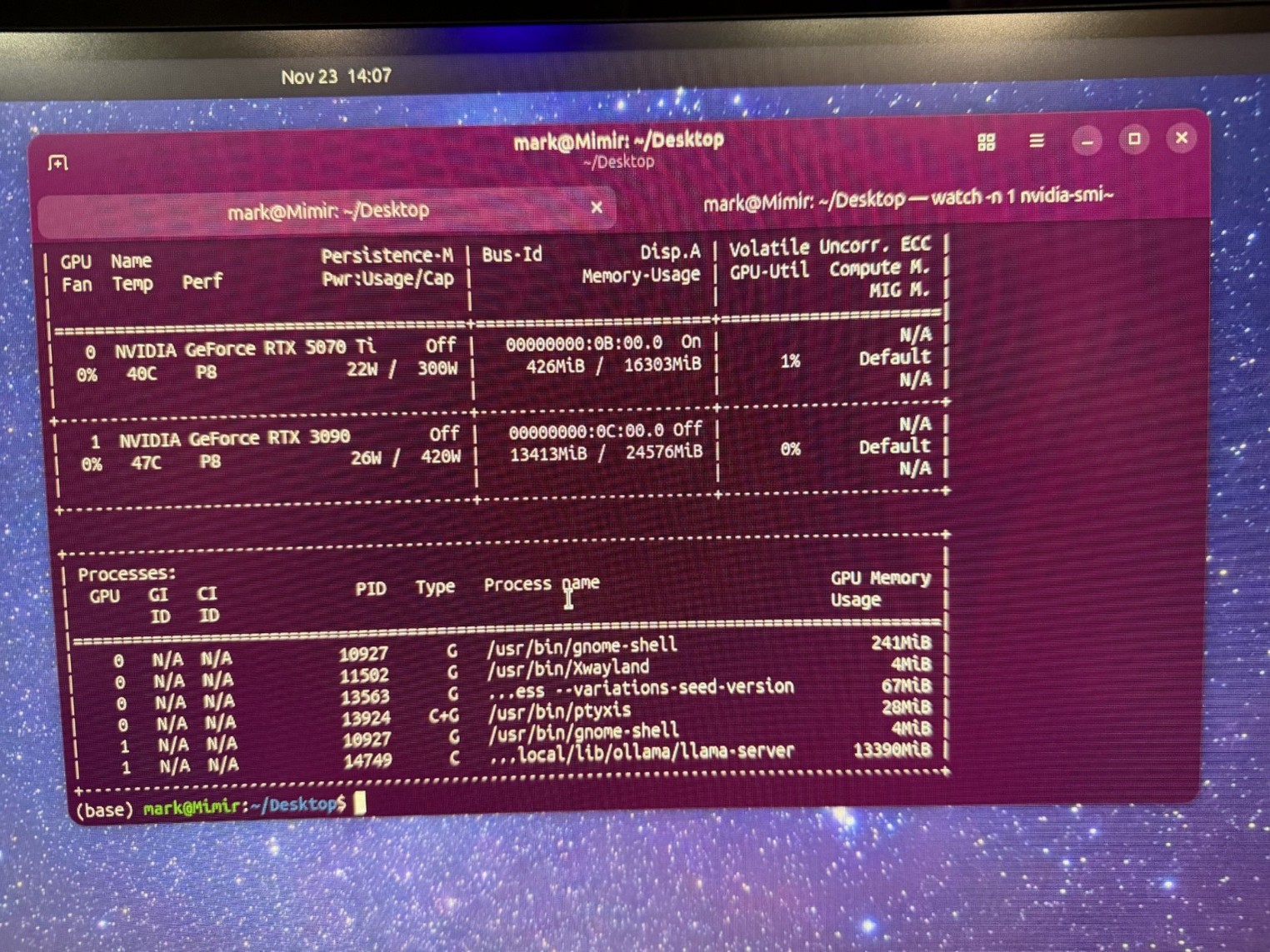
A measured Ollama baseline
Before adding RAG, vector databases, agents, or anything else, I wanted to know whether the basic idea actually worked well enough to be useful, and it does.
One Ollama run with gpt-oss-20b produced the following results:
Generated tokens: 1,418
Model evaluation time: 8.842 seconds
Calculated generation rate: approximately 160.4 tokens per second
Prompt tokens: 94
Total request duration: 15.46 seconds
Those numbers come from Ollama’s actual run statistics on Mimir.
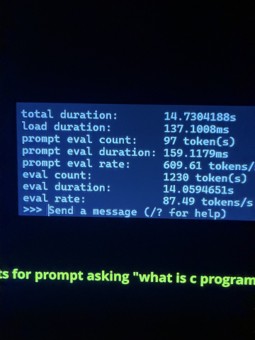
A separate console run reported 1,230 generated tokens in 14.059 seconds, or 87.49 tokens per second. I treat that as a separate measurement; the model, runtime, and test conditions need to be recorded before comparing the rates. The distinction between evaluation time and total request time is worth making. The 160-token-per-second figure describes token generation during model evaluation, not the complete end-to-end transaction. Model Loading, prompt processing and other overheads pushed that particular request to about 15.5 seconds overall.
Still, seeing a 20-billion-parameter model generate about 160 tokens per second on hardware sitting in my house changed the project for me. It was no longer just a test of whether local inference could run; it was fast enough that I could imagine relying on it. This wasn’t going to be a novelty that technically worked but was irritatingly slow. It was fast enough that I could start treating it as infrastructure.
Fafnir: the persistent services system
Running a model locally solves only part of the problem. I eventually want to ask the system questions about my own data. That means documents need to be ingested, parsed, divided into chunks, converted into embeddings, indexed, retrieved, and supplied to the model as context.
I could run all of that on Mimir, but I’ve decided not to. Instead, I’m using the the HPE ProLiant MicroServer Gen10 Plus that is already running Unraid. Fafnir continues to serve as the storage system and will host the project’s Open WebUI and RAG services.
Fafnir has a Xeon E-2246G, 32 GB of ECC memory, four 12 TB hard drives, and NVMe storage for faster application data. It isn’t an AI powerhouse, and it doesn’t need to be.
The computationally expensive LLM inference belongs on Mimir’s RTX 3090. The MicroServer is much better suited to being the persistent-services host: document ingestion, embedding generation, vector storage, the user interface, storage integration and orchestration. That separation gives each system a very clear job.
The architecture
The architecture has three layers: user devices, Fafnir handling the application and retrieval work, and Mimir handling inference. Fafnir accesses the documents and Mimir’s model API; Mimir receives the assembled prompt and returns an answer.
The basic flow looks like this:
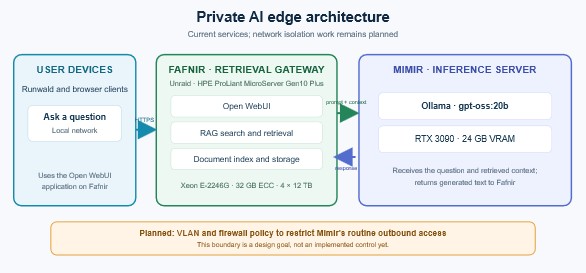
User devices → MicroServer RAG/application gateway → Mimir inference server
Fafnir hosts the application layer. Open WebUI accepts a question; the RAG service searches the document index for relevant passages, then sends the question and retrieved context to Mimir through Ollama’s API. Mimir does only what I want the GPU machine to do: it generates the answer and sends it back. That is the RAG data flow now running across the two systems.
There is another important detail in the diagram: Mimir doesn’t need to retrieve the original documents itself. That turns out to be one of my favorite aspects of this architecture.
Separating knowledge acquisition from inference
An LLM that can access everything is convenient, but it also presents a large attack surface. If Mimir doesn’t need access to the internet, browsers, document repositories, credentials or general-purpose tools to perform inference, why give it those things?
The target network design gives Mimir no routine outbound Internet access. Fafnir may have controlled outbound access where required and may reach Mimir’s Ollama API on the local network. Neither system should accept unsolicited inbound Internet connections. VLAN and firewall rules to enforce this separation are still planned work.
Once those rules are in place, updates can be handled as a controlled maintenance operation: temporarily allow outbound access, update Linux, the drivers, Ollama, or approved models, test the system, then restore the normal “deny” rule.
This isn’t a perfect air gap, nor am I trying to call it one. It’s segmentation, and that seems much more useful for what I’m trying to learn.
RAG is where private AI becomes personally useful
Running a local LLM is interesting. Running a local LLM that can use years of private documents without those documents routinely leaving my network is much more interesting. That’s where RAG comes in: instead of retraining the model on my information, the gateway indexes the documents. When I ask a question, it searches that index for the most relevant passages and gives those passages to the LLM as context.
Conceptually:
Documents → parse → chunk → embeddings → vector database
Then, when I ask something:
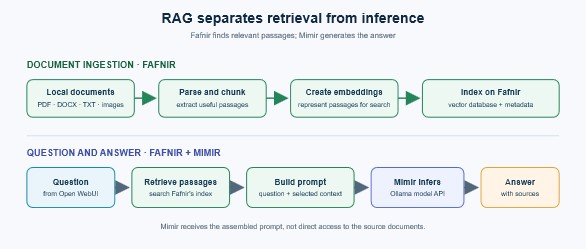
Question → embedding → vector search → relevant passages → prompt → Mimir → answer
The model doesn’t have to “know” everything in advance. The RAG layer gives it the information it needs for that particular request, and the underlying documents and retrieval infrastructure can remain separate from the model itself.
There are security implications here as well. Retrieved documents cannot automatically be considered trustworthy simply because they’re local. A document can contain text designed to manipulate an AI system through prompt injection. My design therefore treats retrieved text as reference material rather than instructions and keeps powerful tools disabled unless they’re explicitly needed.
Private doesn’t automatically mean secure. Architecture still matters.
Building it in phases
I’ve deliberately resisted turning this into a giant weekend installation in which I deploy twelve containers twelve containers and then spend Sunday evening wondering which one broke the other eleven. The project is progressing in phases.
· Phase 1: Local inference. Mimir runs Ollama with gpt-oss-20b on the RTX 3090. Baseline performance is measured. Complete.
· Phase 2: Gateway. Fafnir hosts Open WebUI and RAG services and communicates with Ollama on Mimir across the local network. In place.
· Phase 3: Isolation. Establish VLAN and firewall rules so Mimir has only the connectivity it requires. Planned.
· Phase 4: RAG. The initial retrieval service is running on Fafnir. Next, measure retrieval quality and source handling with a controlled document set before adding more data.
· Phase 5: Hardening. Restrict administration, verify backups, add health monitoring, and document maintenance. In progress.
Only after those pieces are working will I start experimenting with agents, controlled web retrieval, additional models, and other tools. For now, this phased roadmap gives me a way to learn what each layer contributes before I add the next one. It is tempting to add complexity because it is fun, but I’m trying to make myself earn it.
The same questions at personal scale
Obviously, a Ryzen desktop and a MicroServer in my house don’t represent an enterprise AI deployment, but the architectural questions aren’t entirely different.
Where should inference occur, and where should data live? Which system should be allowed to retrieve external information, and what needs network access? What happens when connectivity disappears? How do I keep an inference engine separated from systems that handle untrusted information, and how do I provide useful local context without simply giving an AI unrestricted access to everything?
Those are edge questions. The scale changes, but the underlying architectural problem doesn’t disappear.
I enjoy this project because it lets me explore those questions using actual hardware and real constraints instead of PowerPoint slides.
Bringing AI closer to my data
Cloud AI isn’t going away, nor should it. But I think there is going to be an increasingly interesting middle ground between massive centralized AI services and tiny models running independently on individual devices.
Private AI can occupy that middle ground between centralized services and device models: close to local data, with enough capacity to serve several devices over the network. Mimir and Fafnir form my small-scale experiment in that private AI edge architecture.
So far, I’ve established that local inference works. One Ollama run generated about 160 tokens per second, enough to make the system feel practical. Next, I’ll measure retrieval quality and put the VLAN and firewall boundaries in place. Each step should show whether private AI can be both useful and well contained.
Stay tuned to the HPE Developer Community blog for more tutorials and best practices on using AI.
Related

Getting started with Retrieval Augmented Generation (RAG)
Nov 14, 2024